
Welcome to Anchor Down! Find below some useful information to get the most out of your stay. First of all if you are reading a paper version of this guide then I would recommend reading the online version as it will be up to date, scan the QR code below for the link:

Getting to Anchor Down
Getting to Croyde Bay Beach
Parking
Garage
Keys
Going Out
Departure
WiFi
Bed Linen
Towels
Household Essentials
Heating and Hot Water
Oven
Recycling
Washing Machine and Tumble Dryer
Washing Line
Rear Garden
TV, Lounge and Home Cinema
EE TV Boxes
Getting to Anchor Down
If using a Satnav they can sometimes take you a strange route via some very narrow lanes. The postcode of the house is EX33 1NQ, but the best thing to do set the Satnav for “Saunton”. Come off the M5 at junction 27 and take the A361 to Barnstaple. Keep following the A361 to Braunton, once in Braunton you will arrive at a set of traffic lights with a branch left signposted Saunton. Take the left branch! Ignore your Satnav if it tells you otherwise. Keep on this road, pass through Saunton, you’ll come round the headland and in to Croyde. Please drive slowly and be careful as there are small sections in the village which don’t have pavement, so there may be pedestrians wandering in the street. Turn right immediately after Ralph’s surf shop, opposite the Thatch pub, Watery lane is the first left (about 15 yards).
Arrival time is normally 4pm, departure time 10am, however it may be possible to arrive earlier or later, but please contact me in advance if you require this so I can check with my housekeeper.
Getting to Croyde Bay Beach
Important things first… turn right out of the drive, then right at the top of Watery Lane, turn right at Ralph’s surf shop, walk down the hill, turn left in to the path between Billy Budd’s and the Salt Rock shop, walk straight until you hit the sand! For times and dates the beach is patrolled by life guards see the RNLI patrol calendar.
Parking
There is space on the drive for two cars, and you can also have a third, smaller car in the garage, for example a Golf, Focus, Clio, etc, but not an estate or large 4×4/SUV.
If you need more parking there is a small amount of space on Cloutman’s Lane (turn right out of the drive, go to the top of the road, turn left).
There is also the village hall car park, from the house go down the road, turn left, then turn right, then turn left in front of the village hall, parking rates can be found here.
Please be careful of the small stream running on the other side of the road, the street can be pitch black at night, if in doubt please have someone guide you!
Be careful not to catch the back of your car when turning right out of the drive if parked close to the high wall, especially at night and if you have a long car. Use you mirrors or have someone guide you at night as there is no street lighting and the road can be pitch-black.
Garage
The garage can be used to park a car, or store bikes, surf boards, etc. Please don’t allow children to play in the garage! There are sharp gardening implements, and also paints and chemicals present (these should be out of reach).
Equipment: Important safety information
You may find surf boards or body boards in the garage. Please note these are sometimes left by other guests, so I cannot be held responsible for the quality or safety of any items present. If in doubt do not use them. Croyde Bay is know for rip currents, especially at low tide and when the waves are big, keep away from the rocky ends of the beach. Only enter the water when life guards are on patrol, stay between the black and white chequered flags if surfing, and between the red and yellow flags if swimming or bodyboarding. For times and dates the beach is patrolled see the RNLI patrol calendar
Security
Croyde is a very safe village, with an extremely low crime rate, let’s keep it that way!
Keys
- The front door key will be left in a key safe. This is opened by a numeric code which will be emailed near the time of your arrival
- If you’re going out in multiple groups, or even just going to the beach you can use the key safe to store the front door key. Please ensure the key safe is shut securely and the “clear” slider pressed to reset the lock
- There are keys to lock the patio doors, a garage key, and a window lock key on the key hooks in the hallway. Please keep these keys in the house in the locks or on the key hooks
- Important: When locking the front door you need to pull the handle up just a little bit as you turn the key!
Going Out
Important: When leaving the house unattended please make sure the front and rear sliding patio doors have the latches pushed down and are locked with the key. Otherwise the latch can be pushed down from the outside, and the door slid open!
Departure
On your departure day please:
- Ensure living room fire is switched off, and additional radiators are unplugged (if used)
- Make sure the outside tap on the rear decking is turned off
- Shut all windows, turn off all lights
- Lock the front and rear sliding patio doors
- Lock the front door, return the front door key to the keysafe, and replace the front of the keysafe
Wifi
The network name is “Anchor Down”, please contact me for the password. Unfortunately the internet speed is not great to the house (10mb download, 0.5-1mb upload). If you find the network going slow it may be because someone in the house is currently posting a large amount of photos, or some other kind of large upload. Not only will this slow the WiFi down in the house, it will also take ages due to the slow upload speed. If you plan to upload some large photos a good tip is to switch off the WiFi temporarily on your device and use the 4G/5G on your phone, it will be much faster and also not slow down the WiFi for the rest of the house whilst uploading.
Important: Occasionally the internet stops working: you will be connected to the WiFi but you can’t get websites, email, etc. To fix this go in to the garage, there is a power line network plug on the right hand side wall, it will probably be showing 2 green LEDs (none flashing). Turn it off for 10 seconds using the big button on the hive plug, when you turn it back on you should see 3 green LEDs, one of them flashing rapidly, indicating the network is working again. If the above procedure doesn’t fix it then let me know.
Bed Linen
Bed linen is provided, if staying for more than 7 nights please contact me as a mid-stay linen change can be arranged.
There is a travel cot provided, but please bring your own linen.
Towels
One bath towel per guest is included for stays of 5 nights or more.
Please bring your own towels for stays of 4 nights or less, or contact me in advance to arrange for some to be supplied at a small additional cost.
Household Essentials
Although my house is self catering I include some kitchen essentials (washing up liquid, kitchen roll, dishwasher tablets, etc), hand wash in the bathrooms/toilet, and a reasonable amount of toilet paper (4 rolls per toilet per week, so 8 total for a week). If you think you will use far more toilet paper than this please bring some extra, or if you run out please buy some from the local shops. Do not put kitchen roll or baby wipes down the toilets as the drains are very sensitive to blocking!
Heating and Hot Water
The heating and hot water can be controlled from the Hive thermostat located on the top landing. Press the central dial button to wake up the display and view or edit the current settings. If the heating or hot water doesn’t appear to be working, ensure that the heating or hot water are set to scheduled. This can be achieved by pressing the menu (middle) button, selecting “hot water” using the thermostat dial, and selecting “scheduled” by clicking down on the dial. Repeat this process but select “heating” instead of “hot water”.
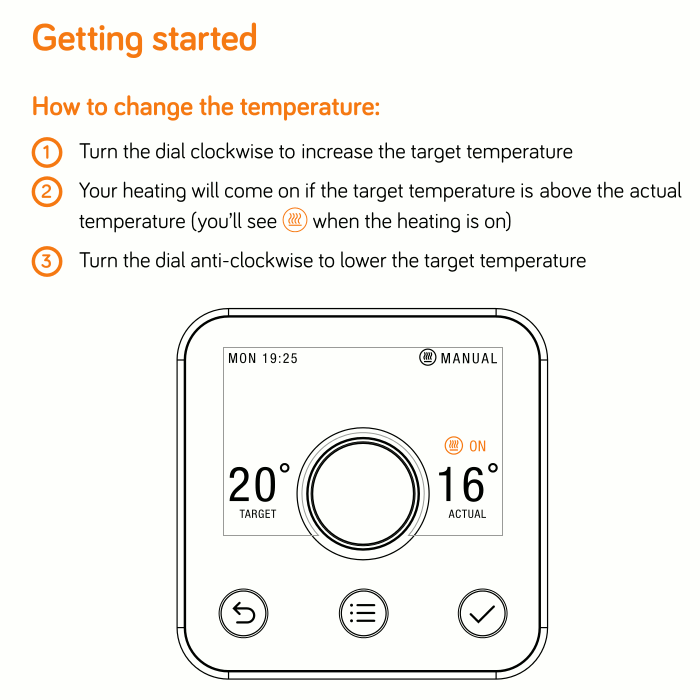
Central Heating
In the winter months the heating is on a schedule, you can override it by turning the thermostat up (or down!), but it will revert to the scheduled temperature setting when it hits any of the following time slots (exact time slots may vary depending on the season):
7:30am – 10:30am
10:30am – 4:30pm
4:30pm – 11:30pm
11:30pm – 7.30am
The thermostat can be turned up at any time to switch the heating on, but please avoid setting it above 24C as it won’t be able to reach higher temperatures. If the heating seems to hot or too cold generally please let me know. If a room or bedroom is too hot with the heating on you can always turn the radiator down, or off, obviously this is more environmentally friendly than leaving a window open.
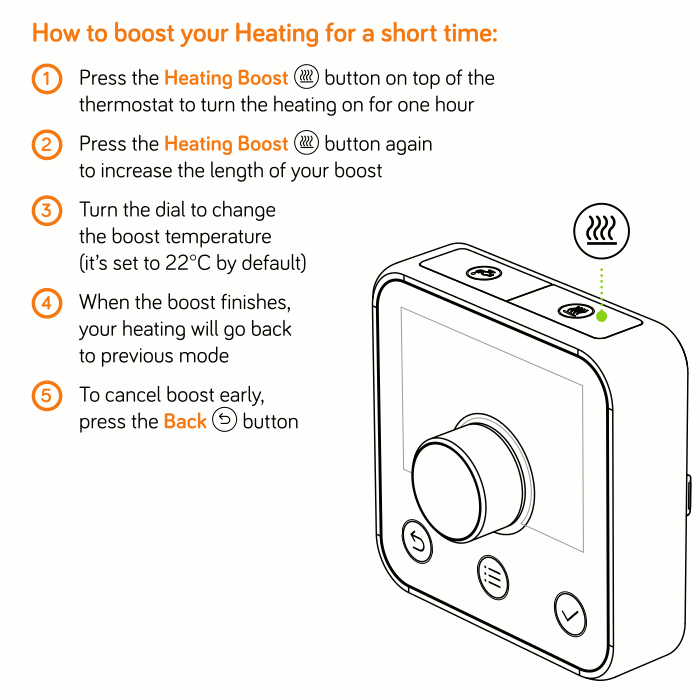
If you want to override the heating schedule for a set amount of hours (so it won’t drop back to the scheduled temperature at the times listed above) you can use boost mode:
- Press the heating boost button, this is located on the top edge of the thermostat, on the right hand side
- If the button pressed again the boost time will increase by an additional hour
- Select the desired target temperature by turning the thermostat dial
- You may be asked to press the green tick on the front of the thermostat to confirm the chosen heating boost time
- Heating boost can be cancelled by pressing the back key (bottom left)
Living Room
The living room can get cooler than other rooms, but its temperature can be independently boosted by using the electric fire in the fireplace without having to turn the main central heating up really high (as this results in the rest of the house being like a furnace!). The living room heater has controls on the unit, and also has a small remote control. If you don’t need to use the heat function the flame effect can be put on independently.
If you need additional heat for a particular room there is a small, electric radiator on wheels which can moved around as needed. Please remember to unplug this radiator when not in use, and before you depart.
Hot Water
Hot water comes from a tank heater by a boiler, it’s also complimented by an immersion heater run from excess electricity generated by the solar panels on the house. As a result there is quite a complex schedule involved, however hot water should always be available, though it’s recommended to leave 10 minutes between each person having a shower to allow the water to heat up again.
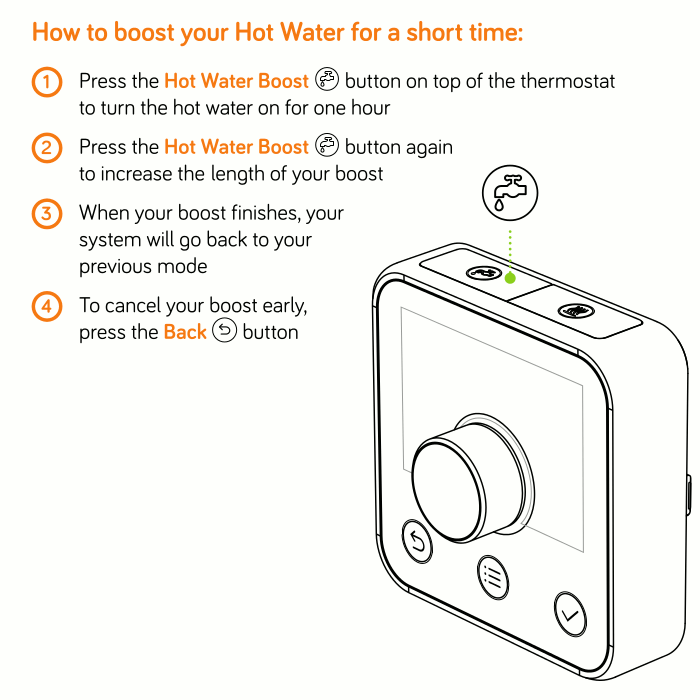
In the extremely unlikely event you run out of hot water and the hive thermostat does not indicate that the hot water is currently heating (it will say Hot Water off/schedule rather than Hot Water on) don’t panic, follow the boost method:
- Press the water boost button, this is located on the top edge of the thermostat, on the left hand side
- If the button pressed again the boost time will increase by an additional hour (an hour will easily heat the entire tank)
- Hot water boost can be cancelled by pressing the back key (bottom left)
Please note it will take 20-30min for the hot water tank to heat up.
Oven
The oven has a safety shut off mechanism, for the oven to switch on you need to press the button which looks like a pot with steam, then use the plus key to set an amount of time which will be enough for you to cook in. If you now select a function using the dial (eg convection oven, grill, etc) and select a temperature, the oven/grill should now work.
Recycling
Recycling day and bin collection day is Monday, if you have moved the recycling boxes and bin please leave them on the front drive by the road side, the collection can be very early on Monday morning so best to ensure everything is out on Sunday evneing. There is a recycling guide on the inside of the door of the corner cupboard to the left of the cooker hood. North Devon has a pretty complex system:
Brown Bag: Cardboard and brown paper.
Green Bag: Paper (but not brown).
Blue Box: Glass.
Black Boxes: Plastic bottles, food trays and metal cans/jar lids/bottle caps (but no black plastic).
Some exceptions are:
- Plastic bags/plastic film from food trays, don’t put these in the recycling boxes, please remove and place in the main black bin.
- Tetra Paks/milk and juice cartons, please don’t put these in the cardboard bag, or any of the boxes, the council don’t accept them for recycling at kerbside. If you wash and squash them (lids on) and either put them in a bag by the recycling boxes or put directly in the black bin I will remove them and take them to the council recycling centre. It’s a bit baffling why the council don’t accept them at kerbside but will accept them at their own recycling centre.
- Black plastic bottles/food trays, these have to go in the main black bin, it took me a while to find out the reason they can’t be recycled, apparently it’s because the optical plastic sorter the council use can’t separate black plastic.
- Large metal beer kegs, if you leave these next to the recycle boxes I will crush them and take the council recycling centre.
Washing Machine and Tumble Dryer
These can be found in the garage, please read the warnings and don’t bang your head on the two steel girders.
Washing Machine
Washing liquid goes in the drawer, compartment II (bottom right), the grey divider has measuring markers. As North Devon is a very soft water area you don’t need much liquid, up to the first marker (50ml or even 35ml) should be ok. Fabric softener goes in the * (asterisk) marked compartment (bottom left).
For a simple 45min wash at 40C first switch the washing machine on using the button (check it’s on at the wall plug), turn the dial to program 3, then hit the start button, this is a quick wash but seems to work really well.
For other cycles turn on the washing machine using the power button, turn the dial to select the desired program, load the machine, then hit the start button.
Tumble Dryer
- The dryer has a sensor which beeps and turns off the machine if it thinks the washing is dry
- The Xpress cycle is a simple one to use
After a cycle has run, or if the machine may beeps at you when you try to start a cycle, check the lights for “water tank full” and “clean filter”, they may be lit. The water tank can (top left) be removed by sliding it out and then tipping it outside the garage. The filter is located at the front of the machine drum at the bottom where the door opens, there are two holes for your thumb and finger, if it’s gently squeezed you can pull the filter cage up and out. There is a small latch on the filter cage, which is hinged. Open up the cage, blow or gently brush the fibres out, close and replace the filter. If in doubt the dryer manual is on top of the machine.
Important: Please don’t use the tumble dryer to dry wetsuits, gloves, or boots, it clogs up the dryer with neoprene fibres and sand, plus it will ruin your wetsuit.
Washing Line
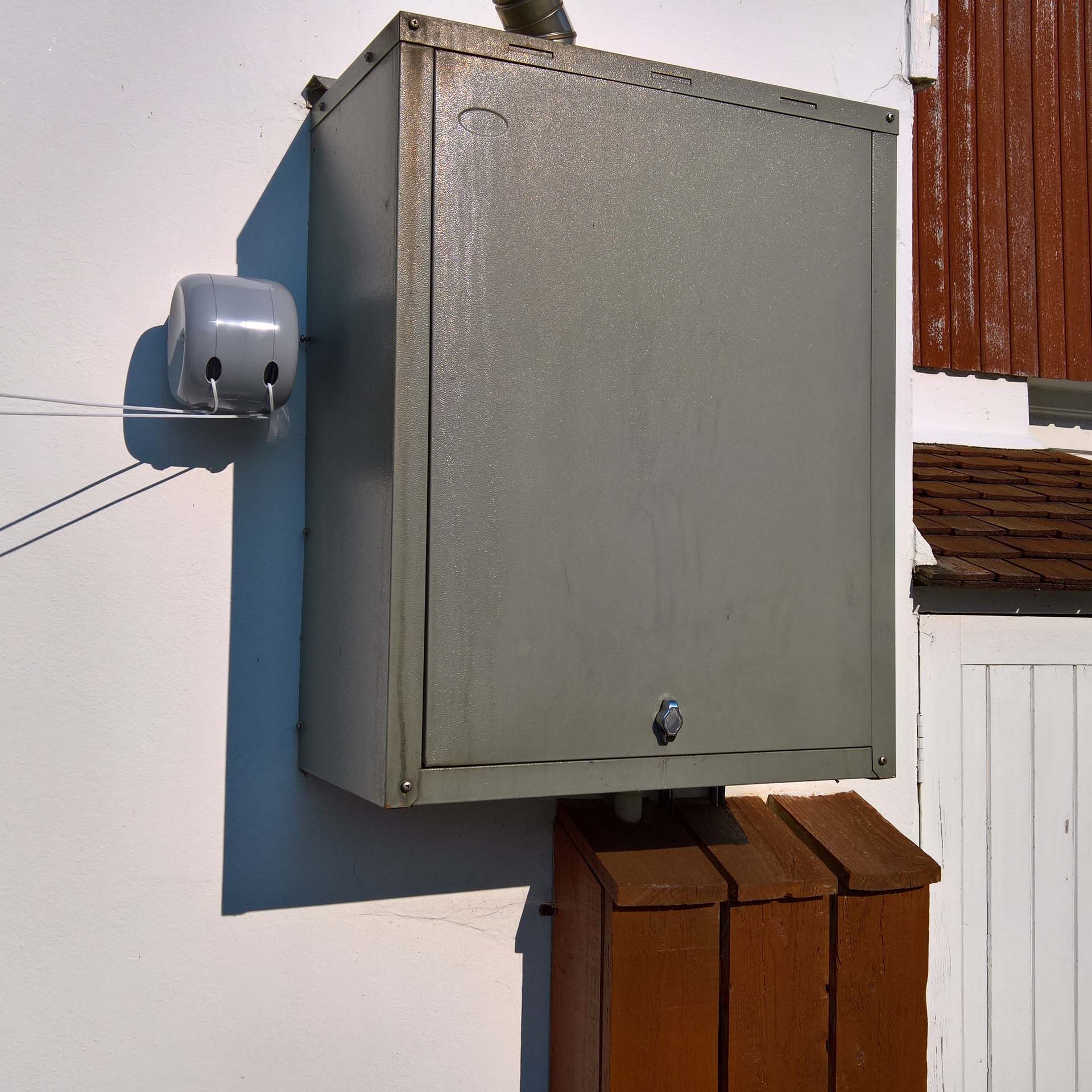
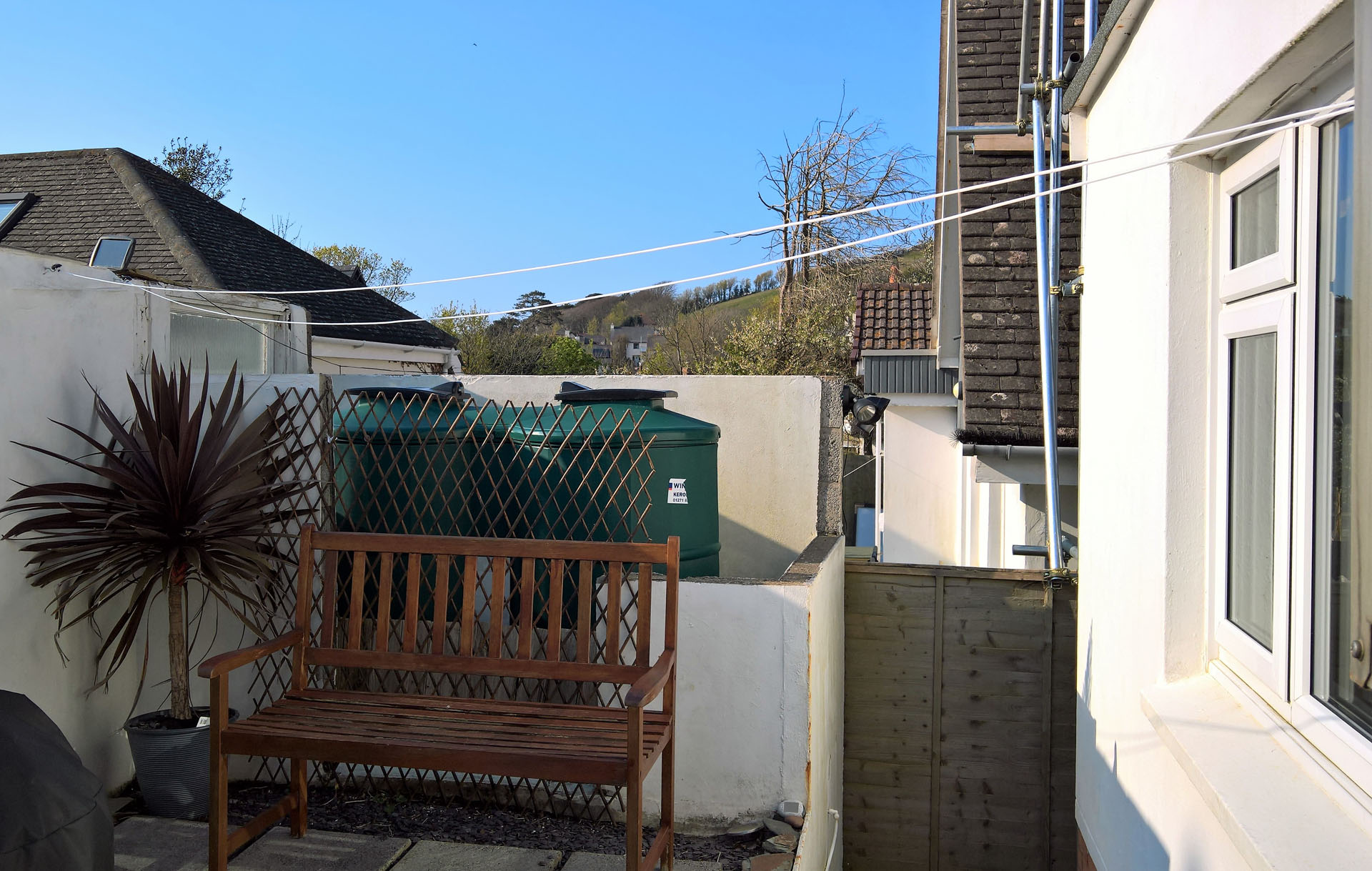
The washing line can be found to the left of the boiler, two lines can be extended and hooked to the wall in the opposite corner. Don’t forget to wrap each line round the nodule on the bottom of the reel holder so the lines lock tight.
Rear Garden
Parasol
- The parasol can be raised by pulling the cord then locking in place with the metal pin
- Please close the parasol down at night, if windy or not in use. The cord can be wrapped round the parasol to stop it flapping around
- If there are strong winds or a long period of rain the top half of the parasol can be removed and stored: loosen the screw of the parasol base, then unscrew the top half of the parasol at the metal ring, the top section can now be removed. The parasol can be left on the back wall, or stored in the garage
Loungers
There are two sun loungers in the garden cupboard, but please ensure all the legs are clicked in to place before gently sitting on them to avoid any comical mishaps.
Barbecue
Important: Please use the heat resistant gauntlets when using the BBQ and don’t use any liquid starters/fuels!
- If in doubt on how to use the kettle BBQ and chimney starter please read the instruction manual in the sideboard in the lounge.
- When cool, the pan at the bottom of the BBQ can be removed, ash from lumpwood charcoal can be tipped in to the green bin, ash from coal or anthracite briquettes should be put in the main black bin. If in doubt please place the ash in the main black bin. Unused lumpwood charcoal can also be placed in the green bin, coal briquettes go in the black bin, however if you have a large quantity of either of these left over let me know as I can use these in my multi fuel stove.
- Please close and cover the BBQ when it’s cooled down, and move back to the far end of the decking, by the wall.
TVs and Lounge Home Cinema
Watching TV in the Lounge
The main TV in the living room has Freeview HD and FreeSat HD, as well as internet based TV apps (BBC iPlayer, Netflix, Amazon Prime, YouTube, etc), press the “Apps” button to access these. If you login to any apps whilst staying at the house don’t forget to logout when you leave, if you forget you should be able to access the relevant account online and logout of the Anchor Down TV from there. The house has a Netflix account which you are welcome to use, please select the “Anchor Down” profile. The TVs in the bedrooms have Freeview but not all channels are available in Croyde, as reception is notoriously bad due to the surrounding hills (see note below about EE TV boxes).
Troubleshooting the Living Room TV
- If there is no picture or you are receiving a “No signal” message press the “Input TV” button on the remote control, ensure TV (the first option) is selected, not “HDMI” or anything else
- If you have done the above and there is still no picture (no signal, and if you push the “Guide” button on the remote there is “No data”) try typing a channel number, eg “110” on the remote, a picture may appear everything works again as normal
- If Freeview reception is bad, or you can’t find a particular channel, you can press the menu button and go to Advanced Settings, in there you can change the TV input source from Freeview DVB to Freesat Satellite, however be warned there are millions of channels and it can be hard to find the one you want (the channel numbers are not logical)
- If you find there are millions of channels, you can’t find the channel you want, and the channel numbers are not logical then it’s likely the TV input source has been set to Freesat Satellite, you could try changing the TV input source back to Freesat (see above point for how to do this)
- If you are still stuck with no TV or a dodgy signal drop me a message and we should be able to work it out
TV Sound
For the optimum experience the TV sound should be output through the soundbar.
Important note: Do not put anything (eg a remote control) on the same shelf as the soundbar (middle shelf), as this will cause noisy vibrations!
Troubleshooting
- Make sure the TV is powered on (red button on the silver Sharp remote control), this should automatically power on the sound bar
- Make sure the soundbar is powered on (red button on the small black Panasonic remote control) if it’s not auto powered on
- Ensure the sound level of the soundbar is set to around 20
- Use the input buttons on the soundbar remote control to select “TV” (if it’s not automatically selected TV, which is should do)
- Adjust the soundbar volume to the desired setting, enjoy!
Problems with the soundbar not syncing with the TV are usually caused because someone has unplugged the HDMI cable from the left hand side of the TV, then plugged it back in the wrong HDMI port. It should be connected to the HDMI port on the left hand side of the TV which is labelled “HDMI4 ARC” and not “HDMI3”.
Bluetooth Audio Streaming
The soundbar can also be used to stream audio over Bluetooth from a mobile phone, tablet, etc. To connect to the soundbar switch on Bluetooth on your device, and put it in to discoverable/search/pairing mode. Switch the soundbar input to Bluetooth and press the pairing button, the devices should now connect and your device will play audio through the soundbar.
Remember to switch the input on the soundbar back to “TV” when watching TV again!
Playstion 3 Games Console
- Use the power button on the Playstation 3 (PS3) games console to switch it on
- If the TV does not switch to the correct AV input automatically press the “Input AV” button on the top right of the silver Panasonic remote control, ensure AV1 is selected
- Press the Playstation button on the PS3 remote control, you can now use this to control the PS3
- There is a wireless and wired PS3 controller in the lounge sideboard, these can also be used to control the PS3, or play games
- Insert a DVD or Bluray in to the disc slot, it should play automatically
Nintendo Wii
The Wii is located at the back of the living room on a small TV. Please don’t setup the Wii on the big living room TV, it’s on a small TV for a reason. The last visitors that connected the Wii to the main TV ended up having a small accident resulting my 55inch TV being smashed. Please don’t do this!
Attaching Your Own HDMI Devices
You can unplug the Playstation 3 and use this HDMI lead, but please remember to plug the lead back in to the PS3 when you leave. There are power sockets to the right of the fireplace.
Bedrooms: EE TV Boxes
In the front and back upstairs double bedrooms you can watch Freeview TV by pressing the input button on the remote and selecting Digital TV (DTV), however Freeview reception in the area is sub-optimal so not many channels are available. A better option is to use the EE TV boxes in these rooms, to do this turn the EE TV box on using the EE TV box remote, they take a couple of minutes to start up, ensure that the correct HDMI input is selected (by using the input/source button on the TV remote). Once powered up the EE box will show a message along the lines of “Cannot show this TV channel Back/Help”, select “Back”, you should then see the home menu page (if this doesn’t appear then press the home button on the EE TV box remote). Once on the home page you can use the remote to navigate up to select and watch iPlayer, ITV Player, Channel 4 player, Netflix, etc.